The daily check-in
A minute a day. One tap each.
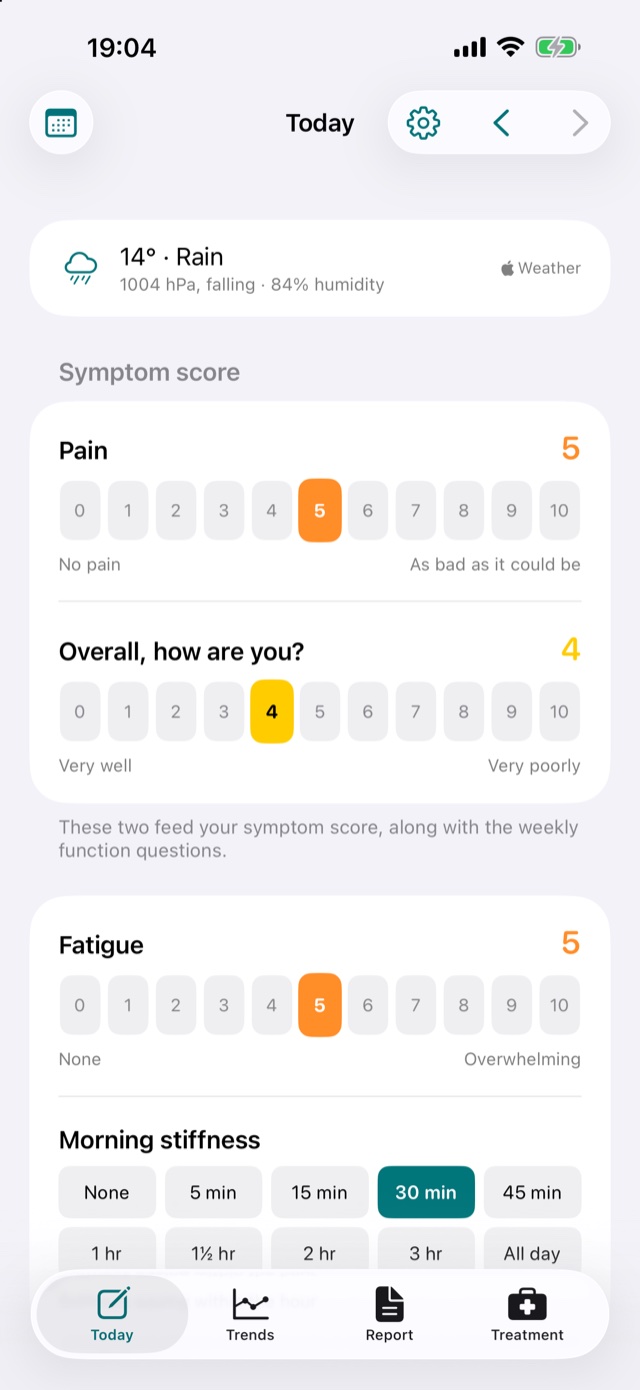
Pain, overall status, fatigue, morning stiffness, sleep and mood, each a single tap, with a switch for flare days. Under a minute, by design.
 JointSignal
Rheumatoid arthritis diary
Built for RA and nothing else. A minute a day becomes the pattern your rheumatologist can act on: not how you feel in the waiting room, but how you have actually been since they last saw you.


Free for your first 7 days. Requires iOS 18 or later. Fits iPhone Duo, folded or open. No account, no ads, no tracking. Apple Health is read-only, and nothing you record is ever sent to me.
Only rheumatoid arthritisOne condition, done properly. No dropdown of diagnoses, and no features that exist for someone else's disease.
Built around your rheumatologistEverything you record is shaped to be read in a fifteen-minute appointment.
Never fabricatedA question you skip stays unanswered. It never quietly becomes a zero.
What it tracks
JointSignal is a rheumatoid arthritis symptom tracker for iPhone: everything a rheumatologist asks about, and nothing that exists for some other condition. Screens below are from the app, unretouched.
The daily check-in
Pain, overall status, fatigue, morning stiffness, sleep and mood, each a single tap, with a switch for flare days. Under a minute, by design.
Joint count
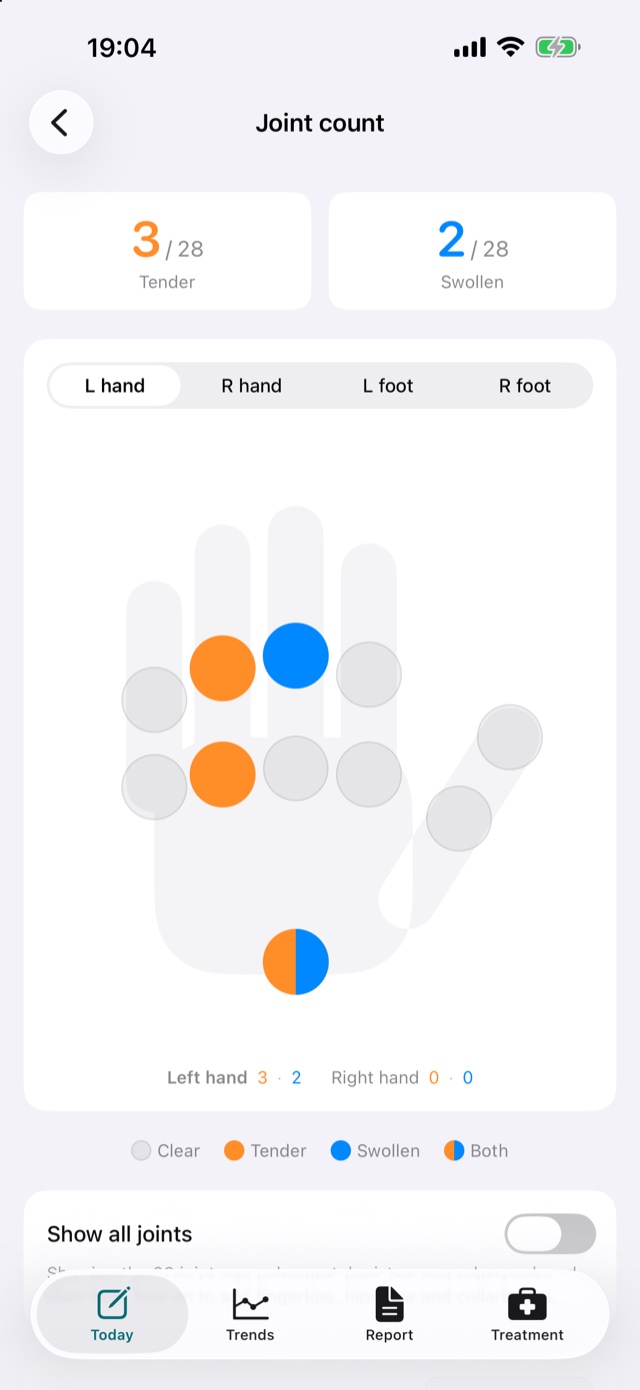
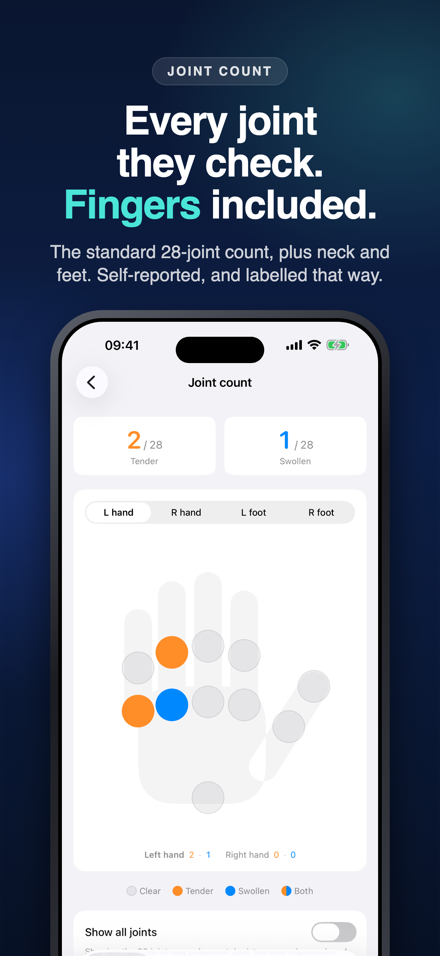
The 28 joints your rheumatologist scores, plus the neck and both feet, with tap targets built for hands with active RA. Tender, swollen, or both. Self-reported, and labelled that way everywhere it appears.
Apple Health, read-only
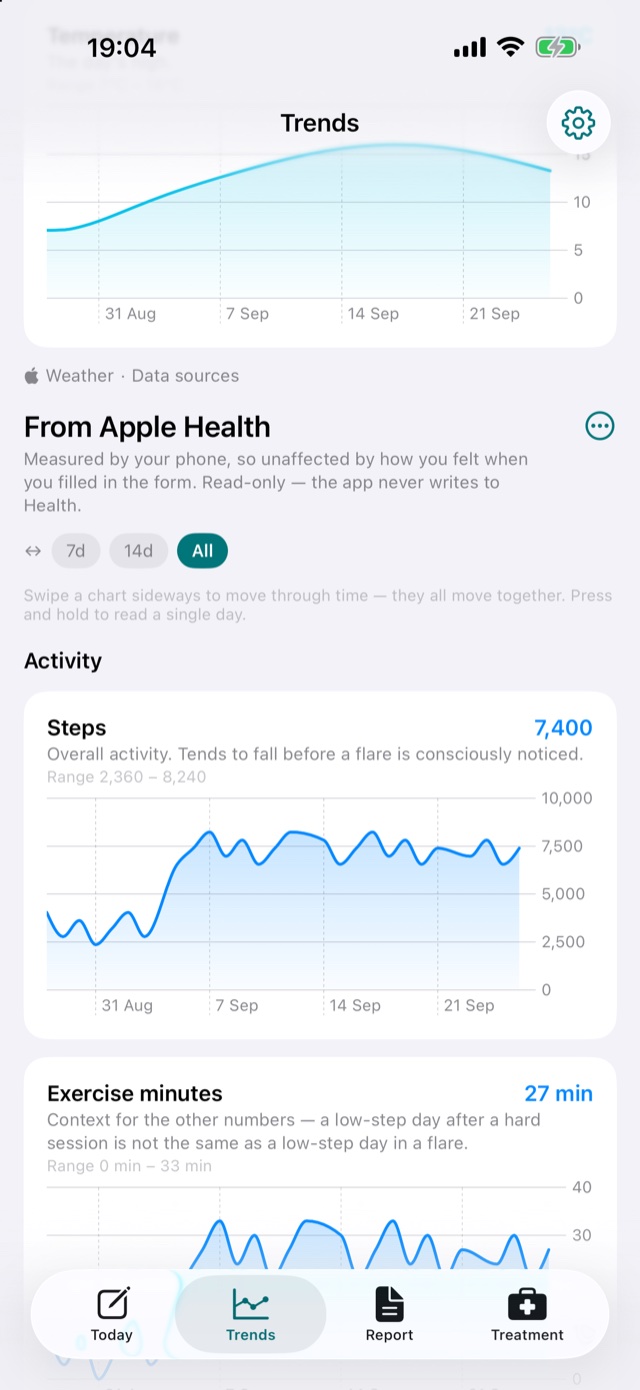
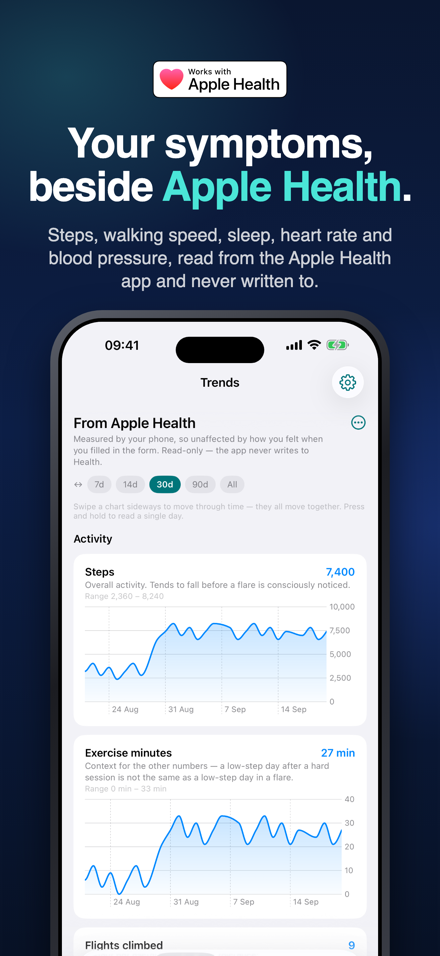
Steps, walking speed, sleep and heart rate sit under what you reported, on one shared axis. Measured by your phone, so unaffected by how you felt that day. The app never writes to Health.
Calendar
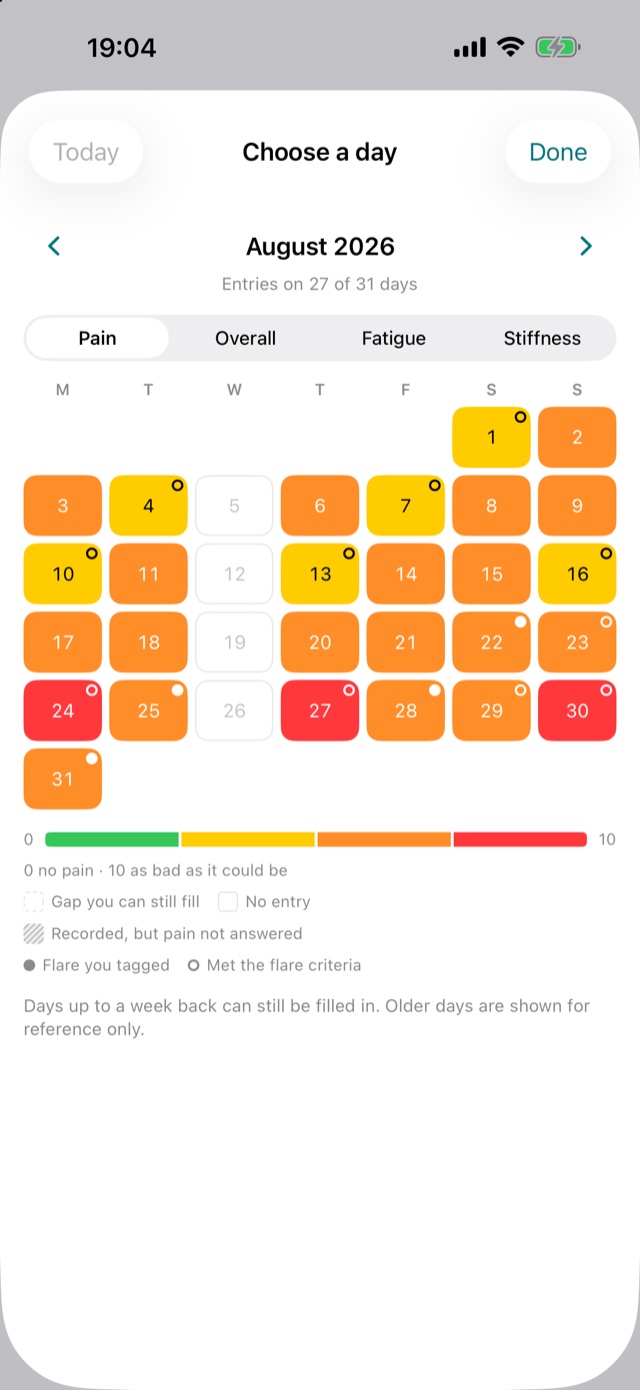
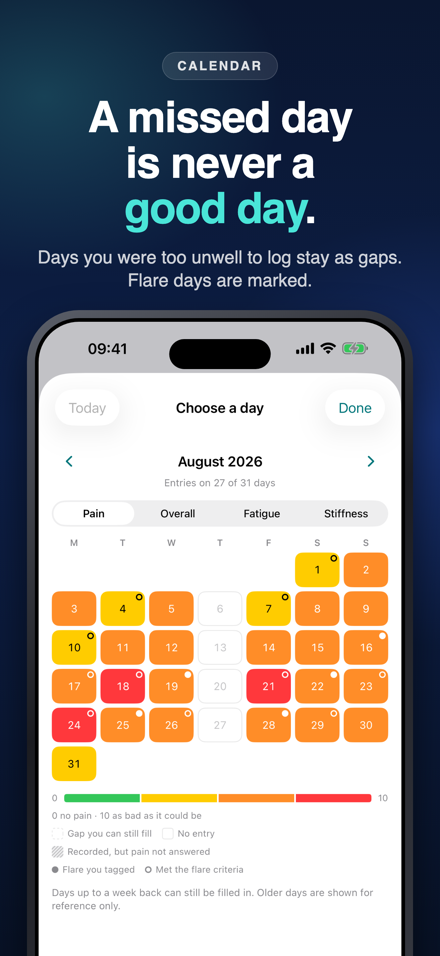
Every day coloured by how bad it was, flares marked, and gaps shown as gaps: the view that shows whether the days you missed were also the worst ones.
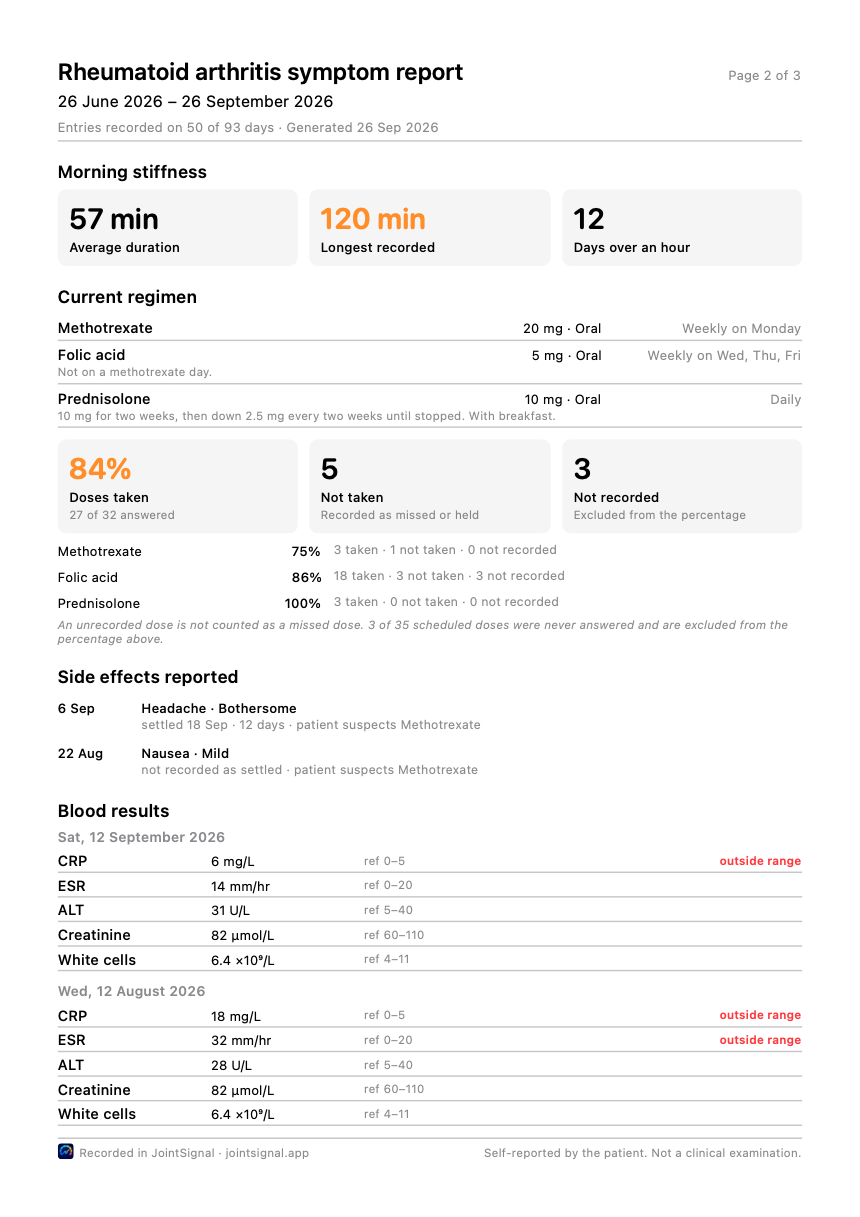
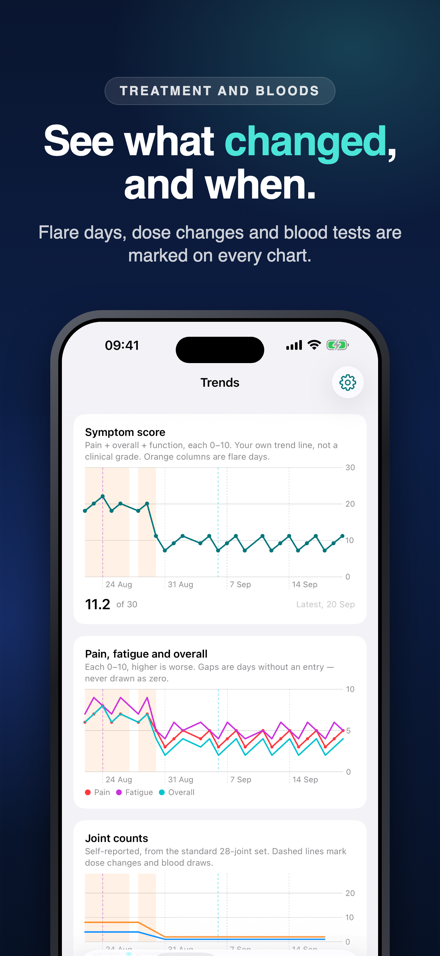
Your regimen, dose by dose, on whichever days you take each one, with a note for how to take it, such as a dose that steps up or down over several weeks. Dose changes are marked on every chart, and a dose you never answered is excluded from the percentage, not counted as missed.
CRP and ESR charted beside your symptoms, the rest of your panel kept with its reference ranges, plus appointment and blood-test reminders so a draw never gets missed before a review.
When it started, whether it has settled, and which medicine you suspect, recorded as a suspicion. Timing against your doses is stated as counts, never as cause.
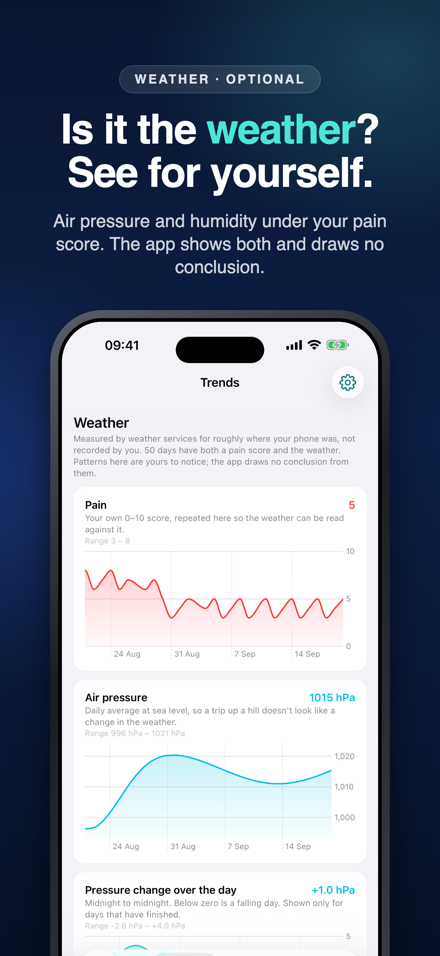
Each day's temperature, humidity and air pressure under your pain score. Off until you turn it on, and the app keeps the weather, never where you were.
Export everything as CSV or JSON, and ask an AI assistant such as Claude or ChatGPT what it shows before you see your rheumatologist. How that works.
A dated backup a day to your own iCloud Drive, thirty kept and never overwritten. There is no server to lose it and no account to be locked out of.
The report
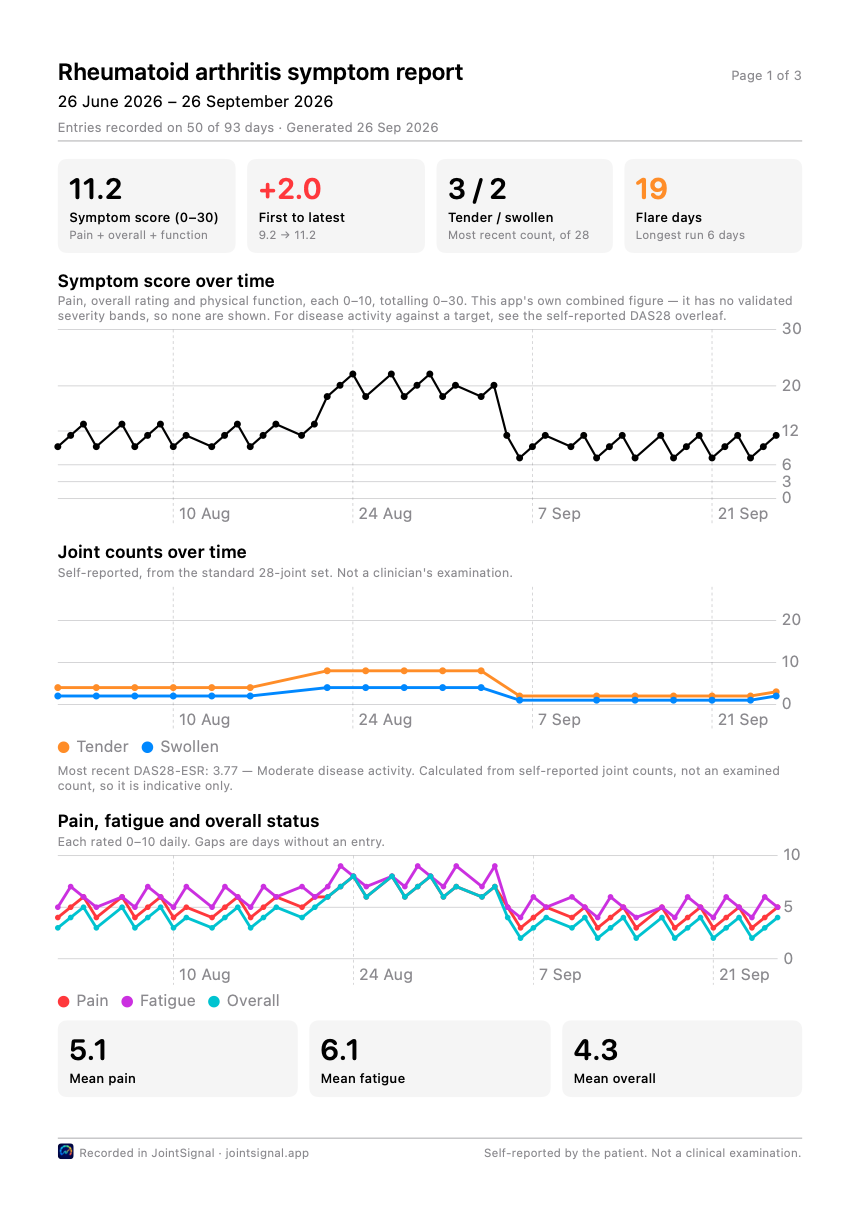
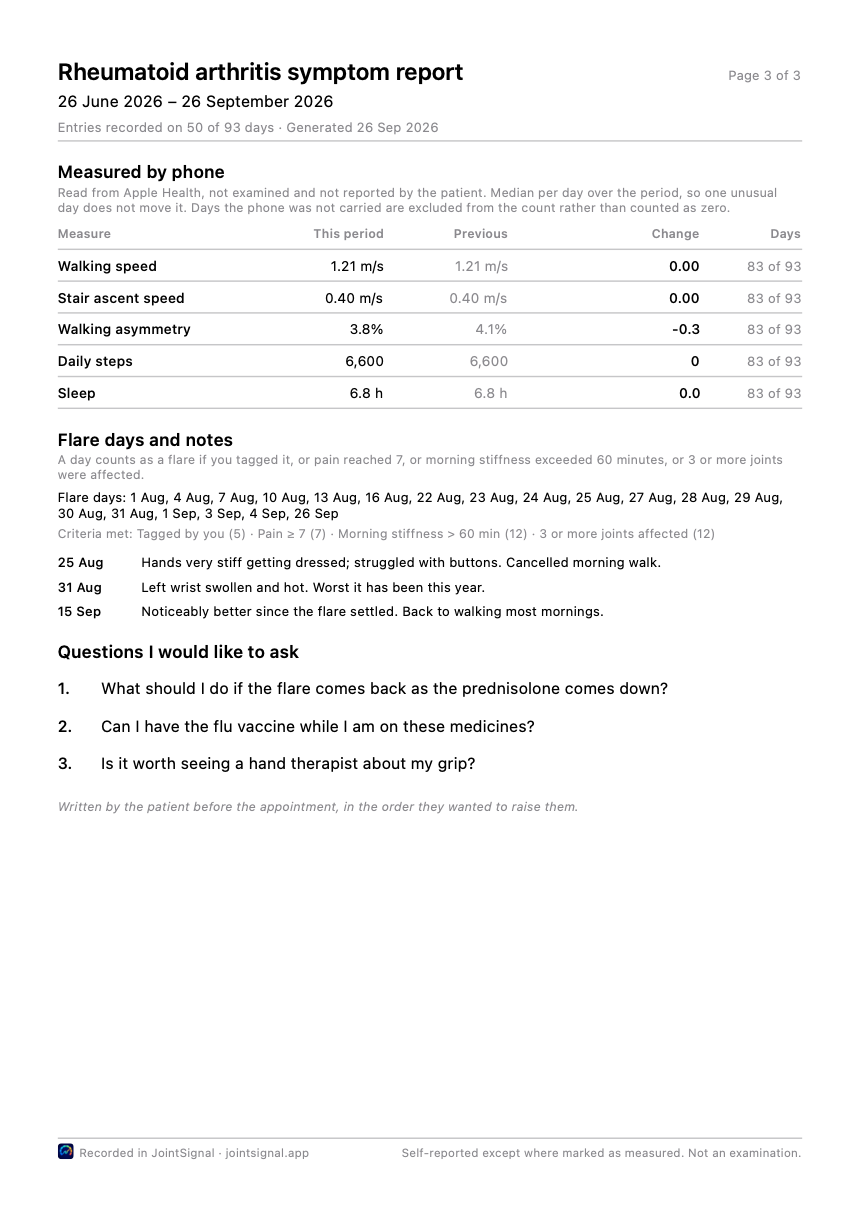
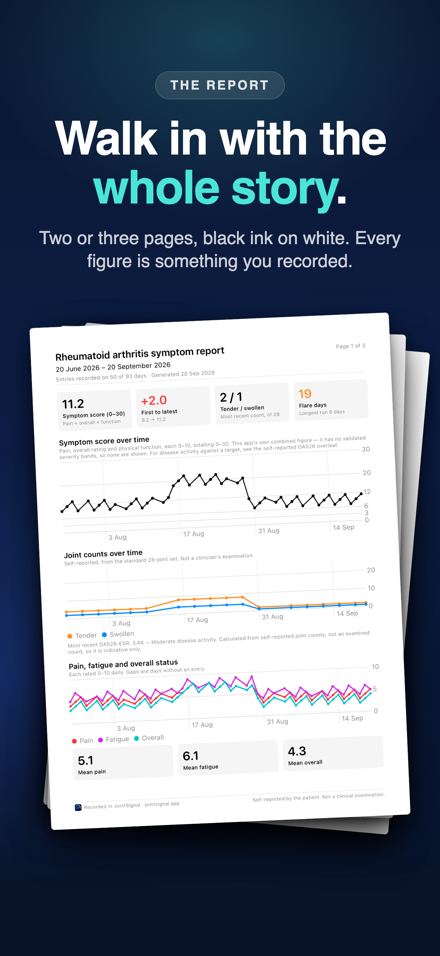
RA is treated to a target: you and your rheumatologist agree where you are trying to get, and adjust treatment until you are there. That only works if they can see how you have actually been between visits, and a short appointment leans almost entirely on what you can remember. JointSignal turns a minute a day into data they can act on.
Before
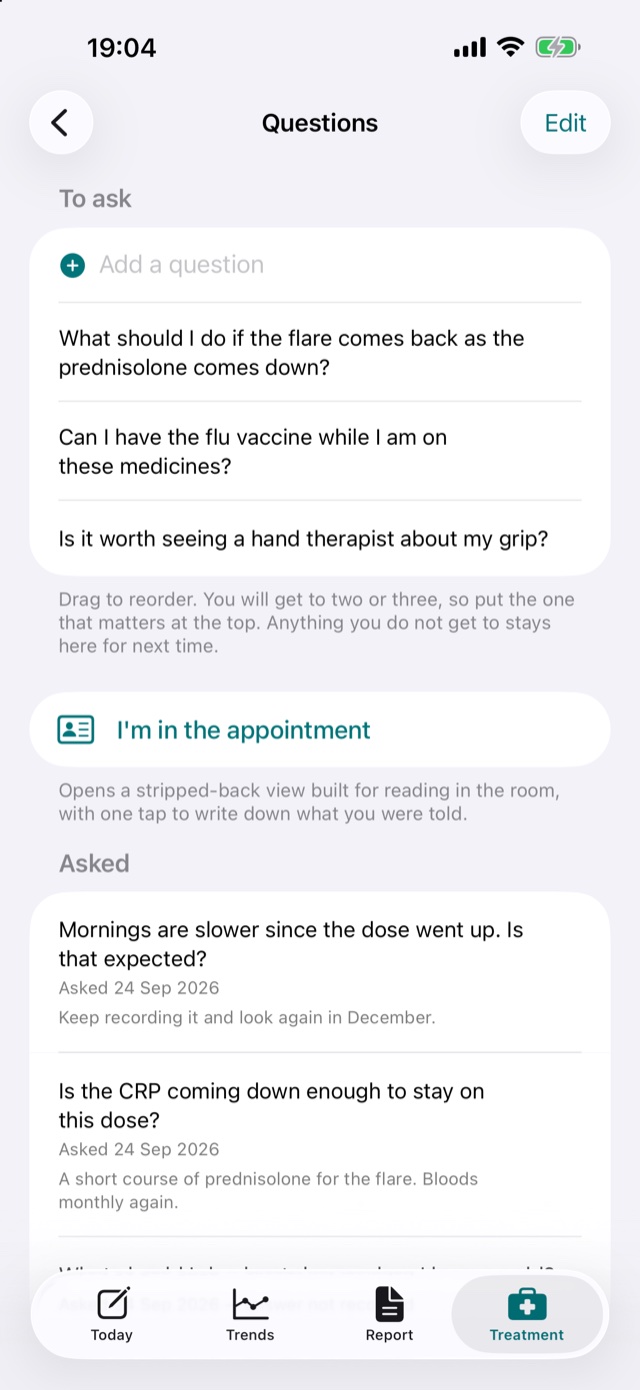
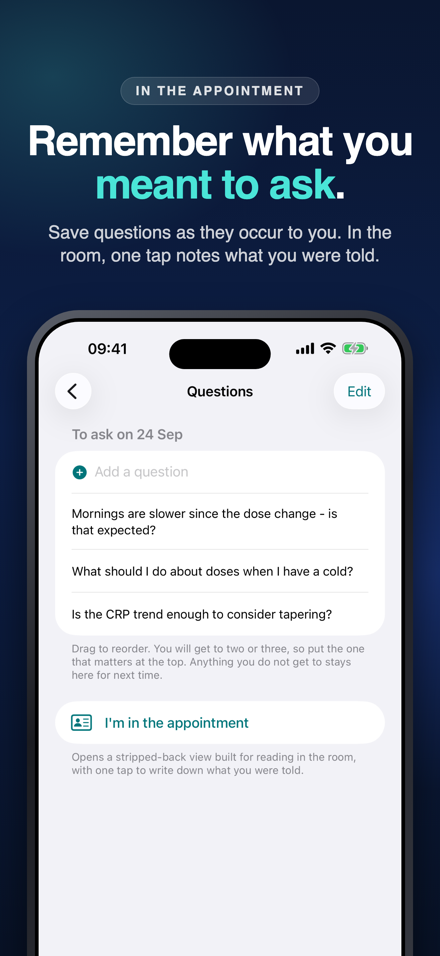
The moment a question occurs to you is never the moment you are in the room. Save questions as they come, put the one that matters at the top, and they print on the report. In the room, one tap opens a stripped-back view built for reading across a desk, with a place to write down what you were told.
After · New in 1.3
Mark each question asked and add what you were told. Every past appointment then opens as its own record: the questions and answers, the side effects you had around then, the medicines you were on that day, and your blood results since the visit before. Questions you did not get to stay on your list for next time.
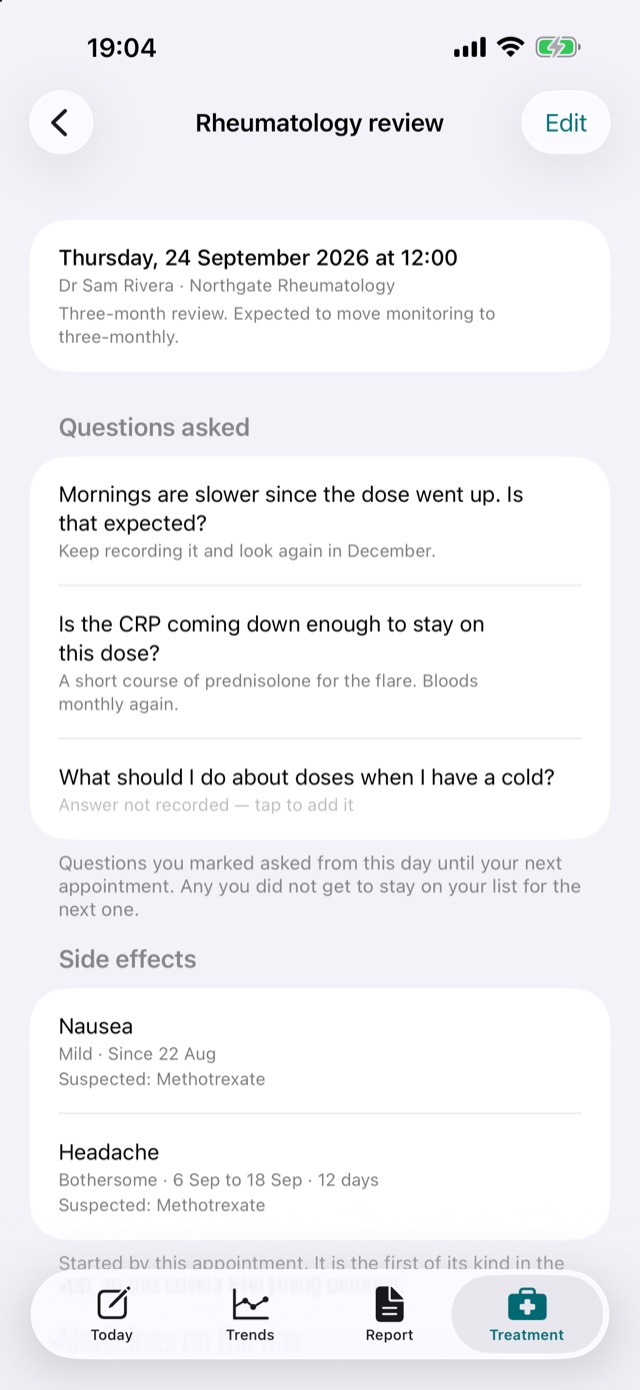
Export the PDF for any date range and email it ahead, AirDrop it at reception, or just hand your phone across the desk. The record of each appointment is read off the dates of what you already entered, so nothing is copied or stored twice.
Read the guide: preparing for a rheumatology appointmentYour data, in your hands
The report is written for your rheumatologist. This part is for you. JointSignal will hand you the whole record as plain files, ready to give to an AI assistant such as Claude or ChatGPT, and you can ask it questions in your own words. You do not need to know anything about spreadsheets.
Questions worth asking before an appointment:
The last of the first three matters most. Treatment is decided with your rheumatologist, and a short appointment goes better when you arrive with the right questions. Save what comes out of it under Questions, and it prints on your report.
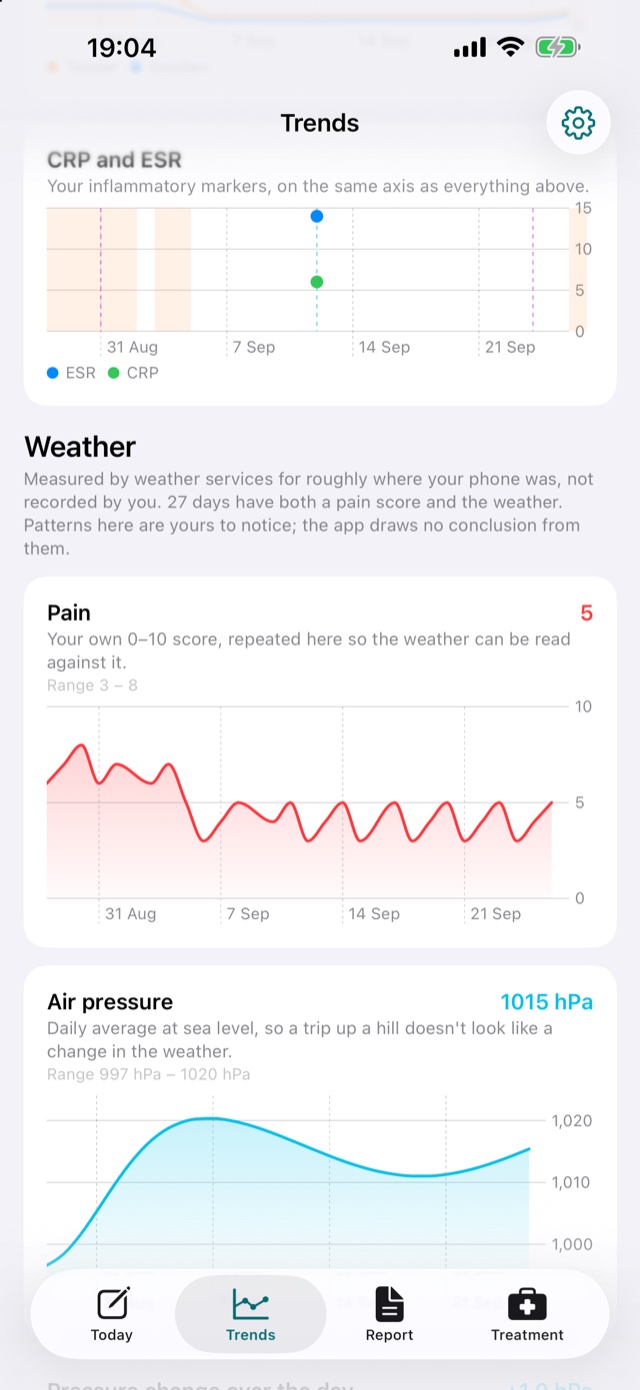
Plenty of people with RA are sure it does, and the research is mixed: some large studies find small effects from humidity and falling pressure, others find none. Switch weather on and Trends draws your pain score above air pressure, its change over each day, humidity and temperature, on one time axis. It tells you how many days have both, and stops there. No verdict: a few dozen days of one person's diary can suggest a pattern worth raising, not prove one.
Weather is off until you turn it on. When it is on, the app sends your approximate location, rounded to about 10 km, to Apple’s weather service, and nothing you have recorded goes with it. Your location is never stored.
Two things to keep in mind. An AI assistant can describe patterns in what you recorded. It cannot examine you, it knows nothing about you beyond the file, and it can be confidently wrong, so treat what it says as something to take to your rheumatologist rather than something to act on. And once you give the file to an AI service it has left JointSignal’s hands: what happens to it next is set by that service’s privacy terms, not this app’s, so it is worth checking their settings before you share. JointSignal itself sends the file nowhere.
One rule that doesn't bend
A question you didn't answer stays unanswered. It never quietly becomes a zero, and a day you missed never appears on a chart as a good day. A report is only useful to a clinician if everything on it is something you actually said.
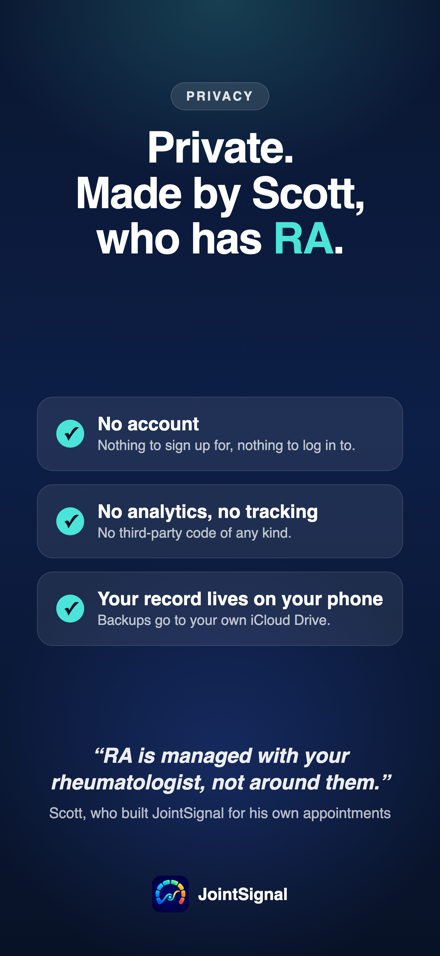
I'm Scott. I have rheumatoid arthritis, and I use JointSignal every day, the same app you can download, to manage it alongside my own rheumatologist.
I went looking for an app that would let me track RA properly and could not find one. The apps I tried covered several conditions rather than one condition well. One left the finger joints out of its joint count, which is a strange omission for an arthritis app. None of them read Apple Health, so the thing my phone already measured all day sat in a separate app from the thing I was typing in every evening. I was paying a subscription for that.
The bigger problem was what those apps thought tracking was for. RA is managed with your rheumatologist, not around them. Appointments are short, they happen a few times a year, and the decisions made in them lean almost entirely on what you can report about the months in between. What helps is the pattern, not the impression: how long the stiffness really lasts in the morning, which joints have been swollen and when, what the fatigue has done over weeks, when the flares came, what you were taking and whether you actually took it.
So I built the app around the appointment: a check-in fast enough to do every day, a record honest enough to hand over, and a report a rheumatologist can read in a minute.
And JointSignal is not a company. It is just me, in Christchurch, New Zealand, building the thing I needed, with far more hours in it than a subscription will ever pay back. The subscription covers the costs of operating the app and keeping it maintained, and your data is worth nothing to me because I never receive it. I'm one person on the same road as you, walking alongside everyone else living with RA, hoping the thing that helps me helps you.
The check-in that takes a minute, a joint map built for sore hands, charts that leave your missed days as gaps, and the report you hand over. These are the ten screens the App Store shows, each with a line on it to say what you are looking at.
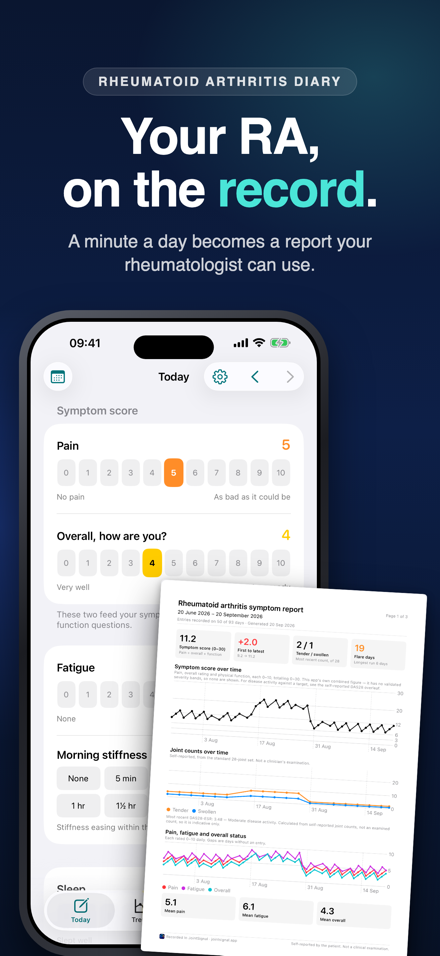
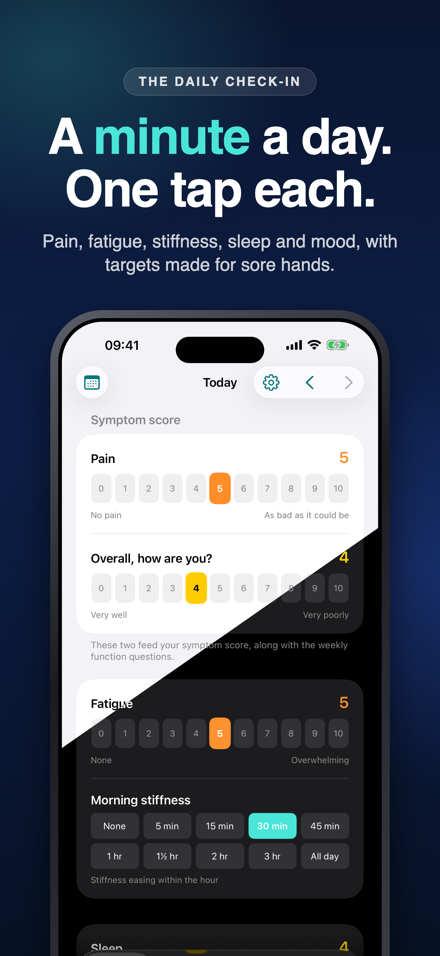
The whole app, no tiers. A tracker that withholds your own joint count behind an upgrade is not a tracker.
NZ$69.99 a year
or NZ$6.99 a month
Prices in New Zealand dollars. The App Store shows yours in your own currency.
Free for your first 7 days. Nothing to sign up for.
If your subscription ends, you keep full access to read and export everything you recorded. Your history is never held to ransom against a payment.
No. JointSignal doesn't diagnose anything and it isn't medical advice. It records what you tell it and shows you the patterns. Your rheumatologist does the rest. Never delay seeking medical attention because of something this app did or did not show you.
The costs of running the app and keeping it alive. Your data never touches a server of mine. But an app still costs real money and real time to keep going: the domain and website, the developer account, and the ongoing work of new features, security updates, keeping up with each new version of iOS, responding to what people report, and building what is missing. Paying regularly is what makes that an obligation rather than a hobby.
You keep it, and you keep full access to read and export all of it. Locking someone out of their own symptom history would contradict the rule the whole app is built on.
Pain, overall status and physical function, each 0–10, totalling 0–30. It is the app's own combined figure and it deliberately has no severity bands — those belong to validated instruments, and the function questions here are the app's own plain-language set. Use it as a trend line: is it going up or down.
Yes, from your self-reported joint counts, and it is labelled self-reported everywhere it appears. DAS28 has published cut-points, so disease activity against a target is reported through it rather than through the app's own figure. It is not a substitute for your rheumatologist examining your joints.
Within the last week, yes, and the report marks those entries as filled in after the day. Beyond a week the day is read-only. A pain score recalled from further back is a guess, and this app treats a gap as more honest than a guess.
Yes. A weekly medicine can be taken on any days you choose, such as three days in a row, and every medicine has a dosing note that shows on Today, in Treatment and on your report, for instructions like a dose that steps up or down over several weeks. Two limits, stated plainly: a medicine taken twice a day is still one tick a day, with the note carrying the detail, and a planned dose step is recorded as a dose change on the day it happens rather than scheduled ahead. You can also set a reminder for any medicine at any time of day, such as an evening one for the second dose of a twice-daily tablet, under Settings → Reminders.
Mark them asked, and add what you were told if you want to. Each past appointment opens a record of the questions you asked, the side effects you had around then, the medicines you were on that day and your blood results since the previous visit. Questions you did not get to stay on your list for the next appointment. The record is worked out from the dates of what you entered, so nothing is copied or stored twice.
Rheumatoid arthritis, and only that. If you live with a different form of arthritis, this is not the app for you. That focus is what makes it the right one if you live with RA.
Yes. Report → Export data gives you everything you have recorded as CSV files or one JSON file, with a short README that explains the scales so the assistant reads them correctly. Share it into the assistant you use and ask questions in plain English. The app sends the file nowhere itself, and once you hand it to an AI service it is covered by that service’s privacy terms rather than this app’s. An assistant can be wrong, and it cannot examine you, so bring what you learn to your rheumatologist rather than acting on it.
No. Weather is off unless you switch it on in Settings. When it is on, the app asks iOS for your approximate location, rounds it to about 10 km, and sends only that to Apple’s weather service to fetch the day’s temperature, humidity and air pressure. Nothing you have recorded goes with it, and your location is never stored: the app keeps the weather, not the place.
Not currently. Everything lives on one phone, backed up to your own iCloud Drive. Syncing between devices is a genuinely difficult problem to solve without risking the accuracy of your record, and it will not ship until it can be done without that risk.
Yes, on both screens. On the large display, folded open, each screen keeps to a comfortable reading width rather than stretching edge to edge. The layouts are the same ones you would see on any iPhone; there is not yet a separate design that uses the extra space.
No, and there is unlikely to be one. The Apple Health integration is a large part of what the app does.